Auto Coach
Match Simulator
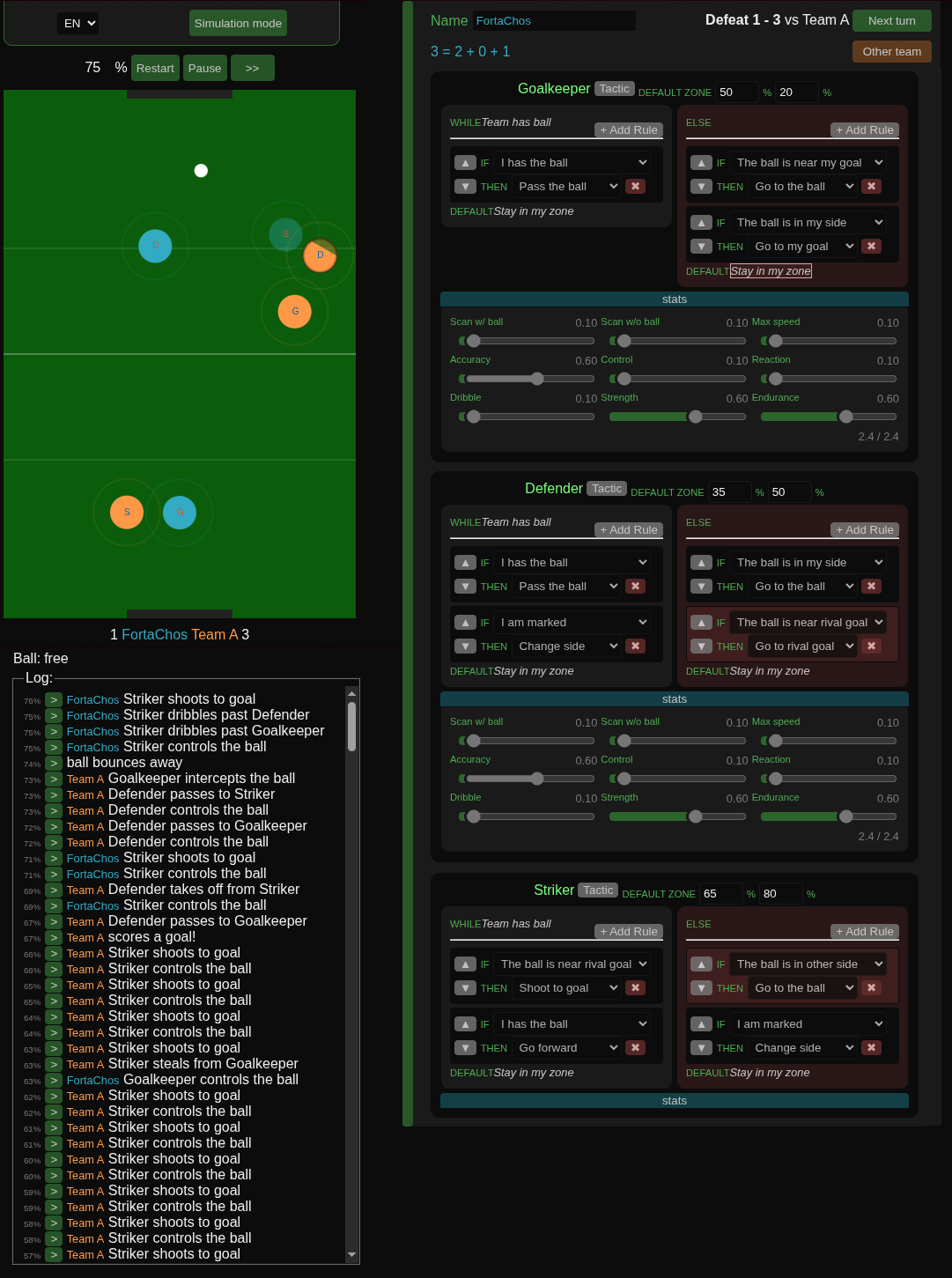
This simulator runs a football match between two teams based on their chosen tactics and player stats. Once the match starts, players act automatically according to their match logic. The user doesn't control players directly — the only influence is the tactical and statistical setup before the match begins.
Each player evaluates their rules in order and executes the first action whose condition is met. Rules can be configured separately for two states: when your team has the ball and when it doesn't. If no condition matches, the player falls back to the default action of the active state.
Team Controls
Select Team
Load a strategy created by the community.
Upload Team
Share your strategy with the community. Please do so responsibly.
Default Zone
Each player has a default position on the field, expressed as a percentage of width and height. This is where the player returns when their active action is Stay in my zone.
Conditions
- I have the ball: True when the player is in possession of the ball.
- I am marked: True when an opponent is close enough to pressure or block the player.
- I am near a rival: True when there is an opponent nearby, even if not directly marking the player.
- The ball is near my goal: True when the ball is in a dangerous area close to the player's own goal.
- The ball is in my side: True when the ball is on the player's half of the field.
- The ball is in other side: True when the ball is on the opponent's half of the field.
- The ball is near rival goal: True when the ball is close to the opponent's goal.
- Rival in my side: True when there are opponents inside the player's defensive half.
- No rival in my side: True when the player's half of the field has no nearby opponents.
Actions
- Stay in my zone: The player moves to their default zone.
- Go to the ball: The player moves directly toward the ball to contest or recover it. If a teammate is already near the ball, the player will move to assist instead.
- Go to near rival: The player moves toward the nearest opponent to pressure or mark them.
- Go to my goal: The player retreats toward their own goal.
- Go to rival goal: The player moves toward the opponent's goal.
- Go forward: The player advances upfield.
- Go back: The player retreats downfield.
- Pass the ball: The player sends the ball to an available teammate. Ignored if the player doesn't have the ball. If no teammate is available, the player waits.
- Shoot to goal: The player kicks the ball toward the opponent's goal. Ignored if the player doesn't have the ball.
- Change side: The player moves to the opposite side of the field.
Player Stats
Each player has nine attributes that affect how they perform during the simulation. All stats start at 0.5 and share a total budget of 4.5 — raising one stat requires lowering others.
- Scan w/ ball: How frequently the player updates their awareness of teammates and opponents while in possession. Also determines how far away the player can passively perceive nearby entities without a full scan.
- Scan w/o ball: How frequently the player without the ball reads the field to reposition or anticipate play. Also controls the perception radius for passively tracking the ball and nearby players between scans.
- Max speed: The player's top movement speed.
- Accuracy: Precision of passes and shots. Higher accuracy means less random deviation.
- Control: The maximum speed at which the player can still take control of the ball. A lower-control player needs to slow down more before receiving.
- Reaction: Chance of winning a dispute when pressing a ball carrier.
- Dribble: Resistance to being tackled when carrying the ball.
- Strength: Maximum physical force behind passes and shots. A stronger player can kick harder regardless of fatigue.
- Endurance: The rate at which the player's stamina recovers during rest. Stamina affects movement speed and kick power. A fatigued player is slower and hits less hard.
Roguelike Mode
Roguelike mode turns the simulator into a single-player progression experience. Instead of configuring two teams freely, the user builds one team and climbs a ladder by facing real strategies uploaded by other players.
How a run works
- Start — The user enters roguelike mode and names their team.
- Play Turn — The user sends their current formation to the server. The server finds the best-matching opponent, runs the simulation, and returns the result and a full match replay.
- Next Turn — The user distributes stats points across each player's attributes and adjusts rules.
- Game over — The run ends when the team accumulates 5 losses. The user can start a new run at any time.
Stat progression
Each player starts with all nine attributes at 0.1. After every completed turn the user can distribute 0.5 additional points per player. Previously assigned points become the new floor — they cannot be reduced.
Rule progression
Players start with a maximum of 2 rules total across both condition blocks. Every 3 completed turns they can add one extra rule, shared freely between the two blocks.
Matchmaking
The server tries to find the most closely matched opponent by cascading through the following filters, each time falling back to the previous set if the narrower set is empty:
- Same matches played — only strategies from teams at the same stage of their run.
- Same wins — among those, teams with the same number of wins.
- Same draws — further narrowed by draw count.
- Same losses — the closest possible record match, selected at random.
Each comparison uses the latest strategy snapshot of every other team, so opponents reflect how that team played at the equivalent point in their own run.
Development log
Leave a comment
Log in with itch.io to leave a comment.